

Creating a GameZone Register account is the first step toward accessing one of the most exciting online gaming platforms in the Philippines. Whether you’re here for the PVP card games, the free tournaments, or the wide selection of casino games, the registration process is quick, straightforward, and designed to get you into the action as fast as possible.
Who Can Register on GameZone?
Before you get started, it’s important to make sure you meet the basic requirements for GameZone Register. GameZone is a PAGCOR-licensed online gaming platform, and as such, access is subject to the following eligibility conditions:
- Age — You must be at least 21 years old to register and play on the platform. This is a strict requirement in compliance with PAGCOR regulations and Philippine gaming laws.
- Valid Mobile Number — A Philippine mobile number is required to complete the registration process, as it will be used for account verification.
- One Account Per Person — Each individual is allowed to create only one account. Multiple accounts are strictly prohibited and may result in permanent suspension.
If you meet all of the above requirements, you’re ready to get started.
What You Need Before You Start
Before you begin the GZone Register process, make sure you have the following ready:
- A valid Philippine mobile number — This will be used to verify your account via OTP during registration.
- A strong and secure password — If you choose to register using the password method, make sure your password is unique and not easily guessed.
- A valid government-issued ID — Not required during registration itself, but you will need one to complete your eKYC verification after registration. Accepted IDs include Driver’s License, PhilHealth ID, UMID, Philippine National ID, Voter’s ID, Passport, TIN ID, and ACR Card.
- A device with internet connection — GameZone is accessible via desktop browser or through the dedicated mobile app on Android and iOS.
Having all of these ready before you start will make the entire process smooth and hassle-free.
GameZone Register: Step-by-Step Guide
Registering on GameZone is simple and takes only a few minutes. Follow the steps below to complete your GameZone Register:
Step 1: Visit the Platform
Go to the official GameZone website on your browser or open the GameZone app on your Android or iOS device.
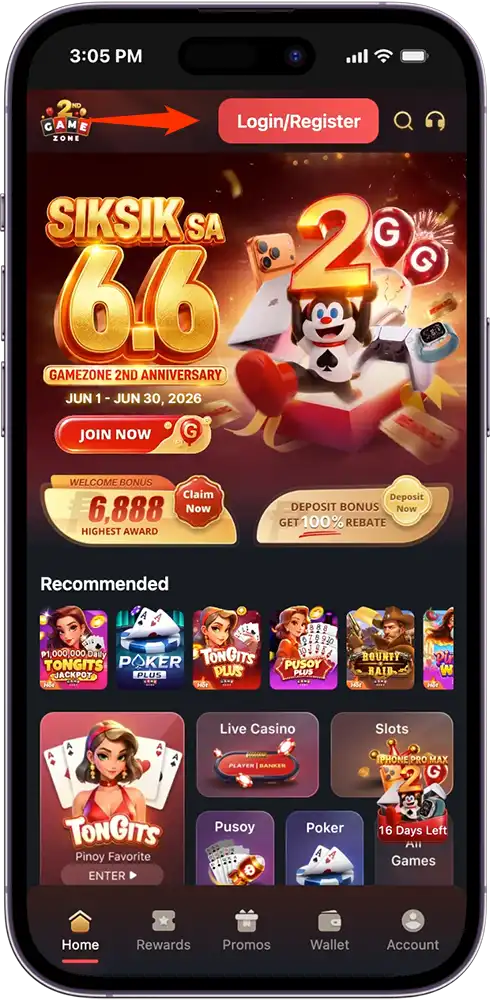
Step 2: Click the Login/Register Button
On the homepage, tap the “Login/Register” button located at the top right corner of the screen.
Step 3: Choose Your Registration Method
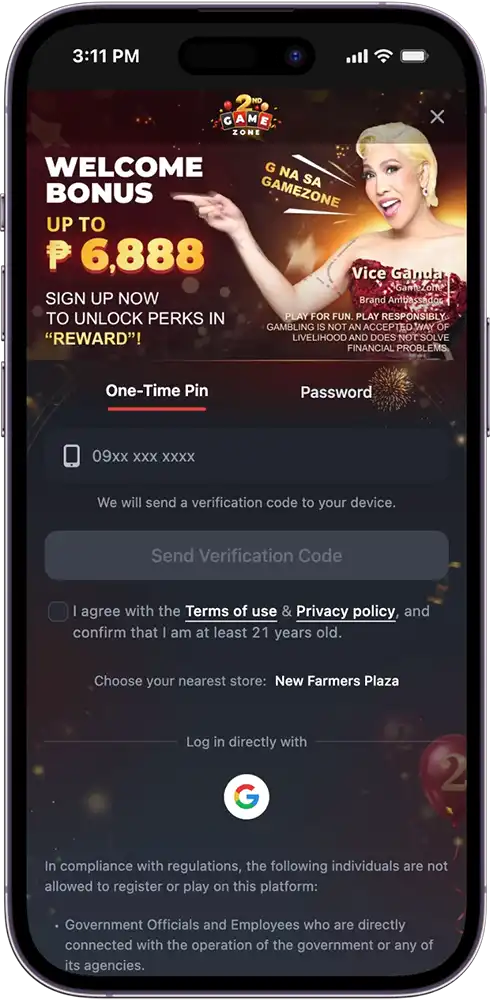
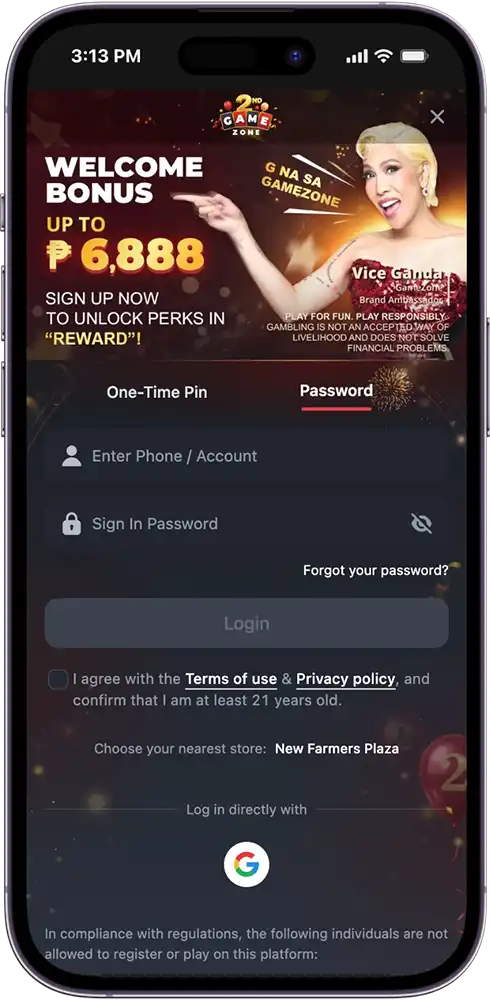
You will be given two options to register:
- One-Time Pin (OTP) — Enter your mobile number and tap “Send Verification Code”. A one-time PIN will be sent to your device. Enter the code to proceed.
- Password — Enter your mobile number or account name and create a secure sign-in password.
Step 4: Agree to the Terms
Check the box to confirm that you agree to the Terms of Use and Privacy Policy, and that you are at least 21 years old.
Step 5: Account Created
Once verified, your GZone Register account is created and you now have full access to the platform — games, tournaments, promotions, and more.
How to Verify Your Account (eKYC)
Once your GameZone Register account is created, the next step is to complete your eKYC (electronic Know Your Customer) verification. This is a one-time process required to unlock deposit and withdrawal features on the platform — and the best part? Completing it comes with a reward.
Why Complete eKYC?
- Unlocks your ability to make deposits and withdrawals
- Keeps your account secure and compliant with PAGCOR regulations
- Earns you a ₱20 Bonus Credit just for completing the verification
How to Complete eKYC:
Step 1: Go to Your Account Settings
Log in to your GameZone account and navigate to the KYC verification section.
Step 2: Select a Valid ID
Choose from any of the accepted government-issued IDs:
Driver’s License, UMID, PhilHealth ID, TIN ID (New or Old), Philippine National ID, Voter’s ID, Passport (New or Old), or ACR Card.
Step 3: Scan Your ID
Follow the on-screen instructions to scan your selected ID clearly.
Step 4: Take a Selfie Scan
Position your face within the frame and take a selfie scan for biometric verification.
Step 5: Submit Your Information
Review your details and submit. Once approved, your account is fully verified and your ₱20 Bonus Credit will be credited to your account.
What You Can Do After Registering
Once your GameZone Register account is live, a whole world of online gaming opens up to you. Here’s what you can access right away:
Play Games
From the moment your account is created, you have full access to our entire game library — PVP card games like Tongits and Pusoy, slots, live casino, fishing games, arcade games, bingo, perya games, game shows, and GZone Original games.
Join Free Tournaments
Newly registered players can immediately join our free live tournaments — including the daily ₱888 Welfare Tournament and the ₱12,888 Pro Cup Tournament — completely free to enter.
Claim Your Welcome Bonus
After completing eKYC and making your first deposit, you are eligible to claim your 100% Rebate Welcome Bonus of up to ₱6,888 — our way of welcoming you to the platform.
Access Promotions and Rewards
Your account gives you full access to all ongoing promotions, the VIP Elite Program, and other exclusive rewards available on the platform.
Play on Mobile
Download the GameZone app on your Android or iOS device and take the full platform experience wherever you go.
Common GameZone Register Issues and How to Fix Them
Running into a problem with your GameZone Register? Here are the most common issues players encounter and how to resolve them quickly:
I didn’t receive my OTP
Make sure your mobile number is entered correctly and that you have a stable internet or mobile data connection. If the OTP still doesn’t arrive, tap “Resend Code” and wait a few seconds. If the issue persists, contact our 24/7 customer support team for assistance.
My mobile number is already registered
This means an account already exists under that number. If you believe this is an error or you no longer have access to that account, reach out to our customer support team to resolve it.
I forgot my password
On the login screen, tap “Forgot Password” and follow the instructions to reset it via your registered mobile number.
My eKYC verification was rejected
This is usually caused by a blurry ID scan, poor lighting during the selfie scan, or a mismatch in information. Make sure your ID is clearly visible, well-lit, and matches the details on your account before resubmitting.
I can’t access the platform after registering
Try clearing your browser cache or restarting the app. If the issue continues, contact our support team via phone, live chat, or email — available 24/7.
Ready to Play? Create Your GameZone Account Today!
GameZone Register is the easiest part — it takes just a few minutes, and once you’re in, everything the platform has to offer is right at your fingertips. From PVP card games and free tournaments to slots, live casino, and exclusive rewards, your next great gaming experience starts the moment you sign up.
Don’t wait — create your GZone Register account today and claim your Welcome Bonus of up to ₱6,888 on your first deposit. The games are ready. The tournaments are live. All that’s missing is you.
Frequently Asked Questions (FAQs)
Is GameZone Register free?
Yes. Completing your GameZone Register is completely free. Simply visit the official GameZone website or download the app, follow the registration steps, and your account is ready at no cost.
How old do you need to be to register on GameZone?
You must be at least 21 years old to register and play on the platform, in compliance with PAGCOR regulations and Philippine gaming laws.
Can I register using my Google account?
No. GameZone Register requires a valid Philippine mobile number. You may register using the One-Time Pin (OTP) method or by creating a password-based account.
How long does eKYC verification take?
eKYC verification is typically processed quickly. Once your ID scan and selfie are submitted, approval is usually completed within a short period. You will be notified once your verification is approved.
Can I have more than one GameZone account?
No. Each individual is allowed only one registered account on the platform. Creating multiple accounts is strictly prohibited and may result in permanent suspension of all associated accounts.