

Making a GameZone deposit is one of the quickest things you will do on the platform — and once it is done, the entire game library opens up to you. GZone keeps the process straightforward by design: a handful of payment methods, a ₱20 minimum, and funds that land in your account in minutes.
This guide covers everything you need to know about depositing — from setting up your account before your first cash-in, to understanding your payment options, processing times, and the bonus waiting for you on that very first deposit.
What You Need Before Making Your First GameZone Deposit
Before you hit that Deposit button, there are a few things that need to be in place. Skipping any of these is the most common reason a first-time deposit doesn’t go through — so it’s worth covering them upfront.
A Registered GameZone Account
You will need a fully created account to deposit. Registration only takes a few minutes — you just need a valid Philippine mobile number to get started. If you have not signed up yet, that is the first step before anything else.
A Supported Payment Method Ready to Use
We currently support GCash, Maya, QR Ph, and GrabPay for deposits. Make sure your chosen payment method is active, funded, and registered under the same name as your GZone account. A name mismatch between your e-wallet and your platform account is one of the most common causes of failed or delayed deposits — so it is worth double-checking before you proceed.
Once both are in order, you are fully set to make your first deposit.
GameZone Deposit: Step-by-Step Guide
The deposit process is the same whether you are on the app or accessing the platform through a browser — clean, minimal steps with no unnecessary back-and-forth. Here is how it works:
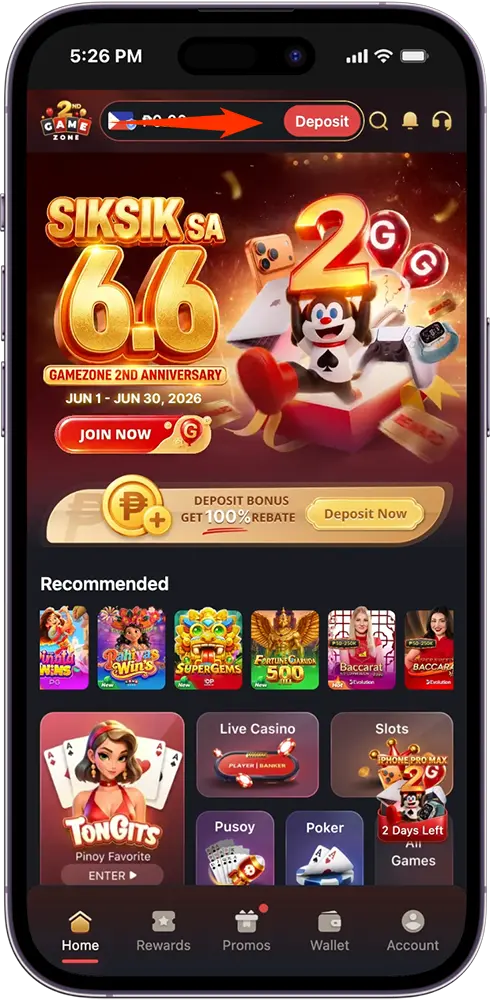
Step 1: Go to Your Wallet
Once you are logged in, tap the Wallet icon at the bottom navigation bar. This will open the Wallet section where you will see the Deposit and Withdraw tabs at the top. Make sure you are on the Deposit tab.
Step 2: Choose Your Payment Method
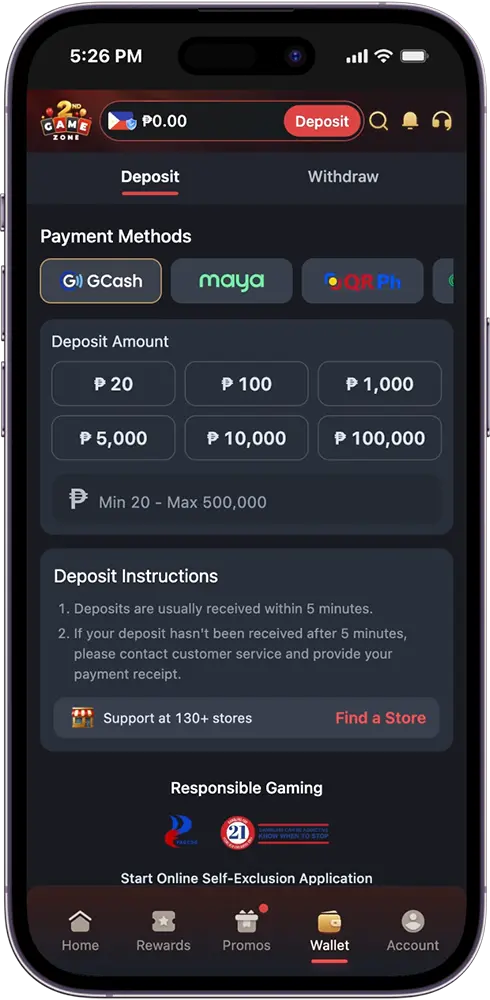
You will see a scrollable row of payment method options: GCash, Maya, QR Ph, GrabPay, MannyPay, and Coins.ph. Tap the one you want to use for this transaction.
Step 3: Select or Enter Your Deposit Amount
Choose from the preset amounts — ₱20, ₱100, ₱1,000, ₱5,000, ₱10,000, or ₱100,000 — or type in a custom amount anywhere between ₱20 and ₱500,000.
Step 4: Review and Submit
Tick the checkbox confirming that you agree to the Terms of Use and Privacy Policy, and that you are at least 21 years old. Once done, tap Submit.
Step 5: Confirm Your Transaction
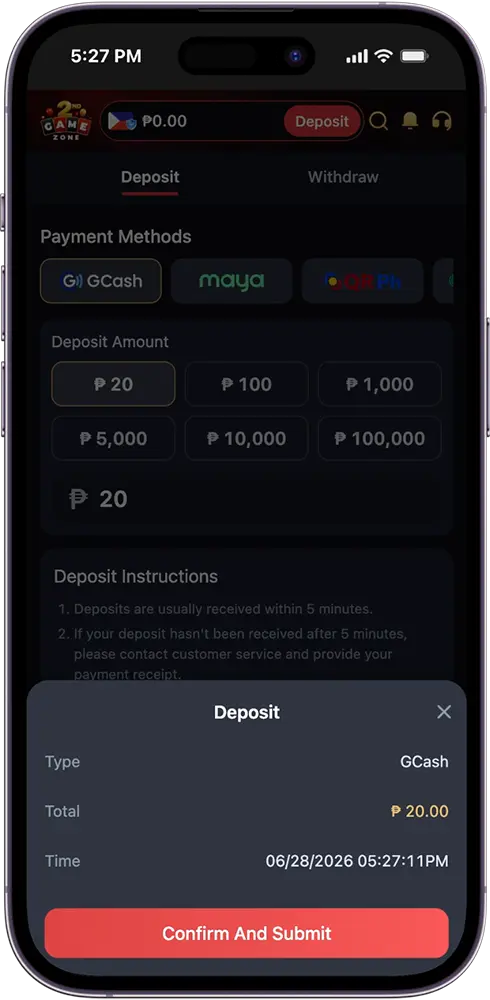
A confirmation modal will appear showing the transaction Type, Total amount, and Time. Review the details, then tap Confirm and Submit to complete your deposit.
Step 6: Complete the Payment on Your Chosen Method
After confirming, you will be directed through your selected payment method’s own verification or approval process. Simply follow the on-screen prompts to complete the transaction. Once done, your funds will be reflected in your account — usually within 5 minutes. If your deposit has not arrived after that window, contact our 24/7 customer support team and have your payment receipt ready.
GameZone Deposit Methods: All Your Options at a Glance
We support six payment methods for deposits, covering the most widely used digital wallets and payment platforms in the Philippines. Whether you are a GCash regular or prefer going through Coins.ph, there is an option that fits how you already manage your money.
Here is a quick look at everything available:
| Payment Method | Type |
| GCash | Digital Wallet |
| Maya | Digital Wallet |
| GrabPay | Digital Wallet |
| QR Ph | QR Code Payment |
| MannyPay | Digital Wallet |
| Coins.ph | Digital Wallet / Crypto |
Each method is fast, secure, and processes your deposit directly into your account. The experience after confirming your deposit will vary slightly depending on which method you choose — your selected platform will guide you through its own verification or approval steps before the transaction is finalized.
All six methods are also available for withdrawals, so the same wallet you use to cash in is the same one you can use to cash out — no need to manage multiple accounts for different purposes.
For a detailed walkthrough of how each payment method works specifically for deposits, we have dedicated guides covering each one.
How Long Do GameZone Deposits Take?
One of the things players appreciate most about depositing on our platform is how quickly funds arrive. In most cases, your balance is updated and ready to use within 5 minutes of completing your transaction — regardless of which payment method you used.
That said, a few factors can occasionally affect processing time:
- Network or server load — High-traffic periods may cause minor delays on the payment provider’s end.
- Incomplete payment steps — If the process on your chosen payment method was not fully completed, the transaction may not push through. Always make sure you follow all on-screen prompts until you receive a confirmation.
- Payment receipt not yet processed — Some methods may take a moment longer depending on how quickly the transaction is verified on their side.
If your deposit has not reflected in your account after 5 minutes, do not panic. Here is what to do:
- Check your e-wallet or payment app to confirm the transaction went through on their end.
- Take note of or screenshot your payment receipt — you will need this when reaching out to support.
- Contact our 24/7 customer support team via phone, live chat, or email and provide your receipt for faster resolution.
In the vast majority of cases, deposits land without any issues. But when they do not, our support team is always standing by to help.
Is It Safe to Deposit on GameZone?
This is one of the first questions any new player should ask before putting money into any online gaming platform — and it is a completely valid one. The short answer is yes. Here is why.
PAGCOR-Licensed and Government-Regulated
We operate under a license issued by the Philippine Amusement and Gaming Corporation (PAGCOR) — the official government body that oversees and regulates all legal gaming operations in the Philippines. This means every transaction on our platform, including every deposit you make, happens within a framework that is legally mandated to be fair, secure, and compliant. A PAGCOR license is not easy to obtain, and maintaining it requires ongoing adherence to strict regulatory standards.
Operated by DigiPlus Interactive Corp.
Our platform is run by DigiPlus Interactive Corp., one of the most established names in Philippine digital entertainment. This is not a faceless offshore operation — it is a Filipino company with a verifiable track record, operating transparently under Philippine law.
Secure Payment Channels
Every deposit method we support — GCash, Maya, GrabPay, QR Ph, MannyPay, and Coins.ph — is itself a regulated and widely trusted payment platform in the Philippines. Your money moves through established, secure channels before it ever reaches your gaming wallet.
When you deposit on GZone, you are not just funding a gaming account. You are transacting on a regulated, Filipino-operated platform built to protect its players.
GameZone Deposit Bonus: Get More From Your First Cash-In
Your first deposit comes with a reward attached — and it is one of the better welcome offers in Philippine online gaming.
New players are eligible for a 100% Rebate Welcome Bonus on their first deposit. The bonus is tier-based, meaning the credit you receive scales with how much you deposit. Here is how it breaks down:
| First Deposit | Bonus Credit |
| ₱20 | ₱20 |
| ₱100 | ₱22 |
| ₱200 | ₱24 |
| ₱500 | ₱30 |
| ₱1,000 | ₱40 |
| ₱5,000 | ₱120 |
A few things worth knowing about this bonus:
- It is available to newly registered players only and can be claimed once.
- The 100% rebate applies at the entry tier. For higher deposit amounts, the rebate percentage may be less than 100%, which is reflected in the bonus credit amounts above.
- Certain games are excluded from this promotion. Full details, including the complete list of excluded games, are available on the promotions page.
It is a straightforward bonus with no complicated hoops to jump through — just make your first deposit and the reward follows.

GZone Deposit Tips Every GameZone Player Should Know
The deposit process on our platform is designed to be smooth and straightforward — but a little preparation goes a long way in making sure every transaction goes through without a hitch. Here are a few practical tips to keep in mind.
Make Sure Your Account Name Matches Your E-Wallet
The name registered on your GameZone account must match the name on your payment method. A mismatch is one of the most common causes of failed or delayed deposits, and it is entirely avoidable. Double-check this before your first cash-in.
Keep Your Payment Receipt
After completing a deposit through your chosen payment method, always keep a copy of the transaction receipt — whether that is a screenshot or a reference number. If anything goes wrong, this is the first thing our support team will ask for.
Use a Stable Internet Connection
Dropping connection mid-transaction — especially during the payment method’s own verification step — can cause the process to stall. A stable connection ensures the transaction completes cleanly from start to finish.
Start With a Smaller Amount if You Are New
There is no pressure to load up a large amount right away. The ₱20 minimum exists precisely so that new players can get familiar with the platform without committing more than they are comfortable with. Get a feel for the games first, then top up based on how much you are enjoying the experience.
Set a Budget and Stick to It
Deposits are easy and fast — which makes it all the more important to go in with a clear limit in mind. Decide on an amount you are comfortable spending before you open the Wallet tab, and treat that as your ceiling for the session. Gaming is most enjoyable when it stays within your means.
Frequently Asked Questions (FAQs)
What is the minimum deposit on GameZone?
The minimum deposit is ₱20 — one of the lowest entry points in Philippine online gaming. The maximum deposit per transaction is ₱500,000.
What payment methods can I use to deposit on GZone?
We currently support six deposit methods: GCash, Maya, GrabPay, QR Ph, MannyPay, and Coins.ph. All six are also available for withdrawals.
How long does a GameZone deposit take to reflect in my account?
Deposits are usually received within 5 minutes. If your balance has not updated after that window, check that your transaction was completed on your payment method’s end, then contact our 24/7 customer support team with your payment receipt.
Do I need to complete eKYC verification before I can deposit?
No. eKYC verification is not required to make a deposit. You only need a registered account and a supported payment method. eKYC becomes a requirement when you are ready to withdraw.
Is there a GameZone deposit bonus for new players?
Yes. Newly registered players are eligible for a 100% Rebate Welcome Bonus on their first deposit. The bonus is tier-based, with credits scaling depending on your deposit amount. This can only be claimed once.
Are GameZone deposits safe?
Yes. Our platform is PAGCOR-licensed and operated by DigiPlus Interactive Corp. under Philippine law. All supported payment methods are regulated and widely trusted platforms in the Philippines, so your money moves through secure channels at every step.
Can I deposit using MannyPay or Coins.ph?
Yes. Both MannyPay and Coins.ph are supported deposit methods on our platform, alongside GCash, Maya, GrabPay, and QR Ph.
What happens if my GZone deposit does not go through?
First, check your e-wallet or payment app to confirm whether the transaction was completed on their end. If it was deducted but has not reflected in your account after 5 minutes, contact our 24/7 customer support via phone, live chat, or email and provide your payment receipt for faster resolution.
Can I deposit on GZone using the mobile app?
Yes. The deposit process is fully available on the GameZone app for both Android and iOS. The steps are identical to the browser experience — just go to your Wallet, choose your payment method, enter your amount, and confirm.
Is there a maximum number of GZone deposits I can make per day?
There is no stated limit on the number of deposits you can make. Each transaction simply needs to fall within the ₱20 minimum and ₱500,000 maximum per deposit.