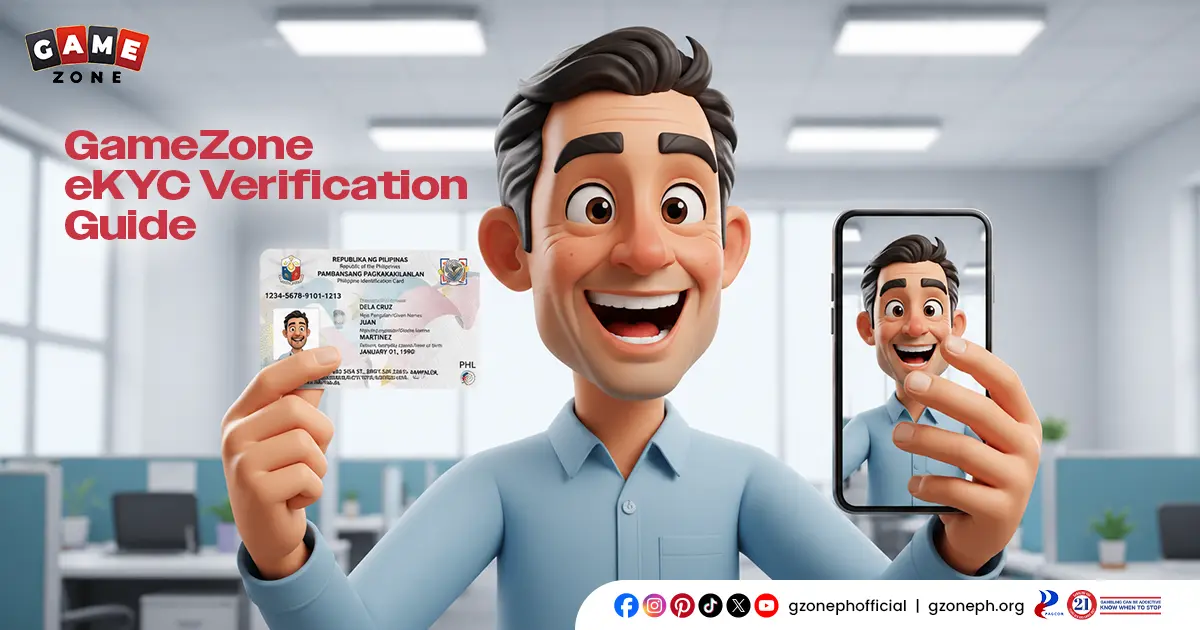
Verifying your account is one of the most important steps you’ll take after signing up. GameZone eKYC verification confirms your identity, secures your account, and unlocks full access to the platform — including withdrawals. It’s quick, fully digital, and designed to be hassle-free.
If you’ve registered with us — or GZone, as some players call us — this guide walks you through exactly how eKYC verification works and why it matters.
What Is GameZone eKYC Verification?
GameZone eKYC verification is our digital identity verification process — a fully online way to confirm that you are who you say you are. eKYC stands for “electronic Know Your Customer,” a standard practice across licensed gaming and financial platforms to prevent fraud, protect accounts, and stay compliant with regulatory requirements.
Instead of submitting physical documents or visiting a branch, everything happens through your device. You select a valid ID, scan it, complete a quick face match, and submit your details — all in just a few minutes. Once verified, your account is fully unlocked, giving you complete access to deposits, withdrawals, and every feature on the platform.
Why eKYC Verification Matters
Completing eKYC verification isn’t just a formality — it directly affects what you can do on your account. Here’s why it matters:
- Unlocks withdrawals — you won’t be able to cash out your winnings until your identity is verified
- Protects your account — verification confirms that only you have access to your funds and personal information
- Keeps the platform compliant — as a PAGCOR-licensed operator, identity verification is part of how we maintain a secure, regulated environment for every player
- Builds long-term trust — a verified account means fewer restrictions and smoother transactions going forward
In short, eKYC is what turns a basic account into a fully functional one. Without it, you’re limited to browsing and playing — verification is what lets you actually enjoy your winnings.
How to Complete GameZone eKYC Verification: Step-by-Step
Ready to get verified? Here’s how GameZone eKYC verification works from start to finish:
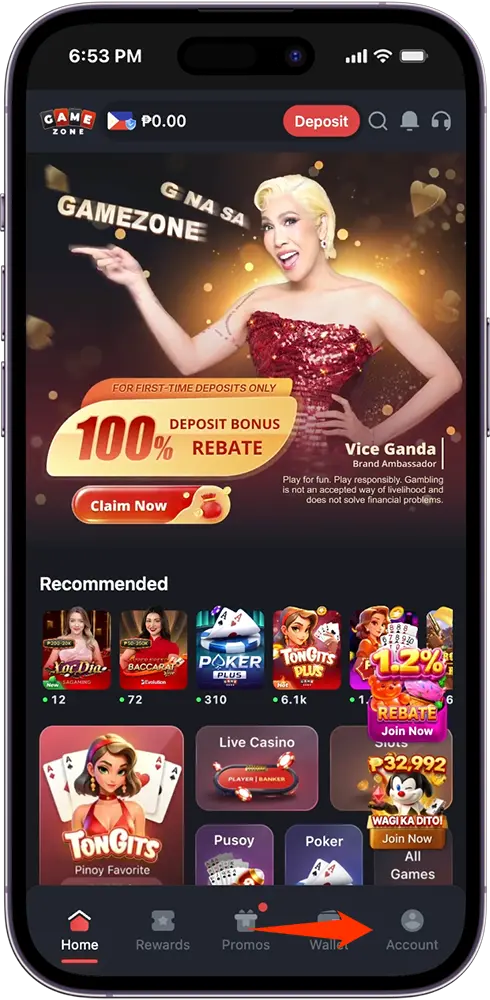
Step 1: Go to Your Account Dashboard
Tap the Account icon on the bottom navigation bar to access your account settings.
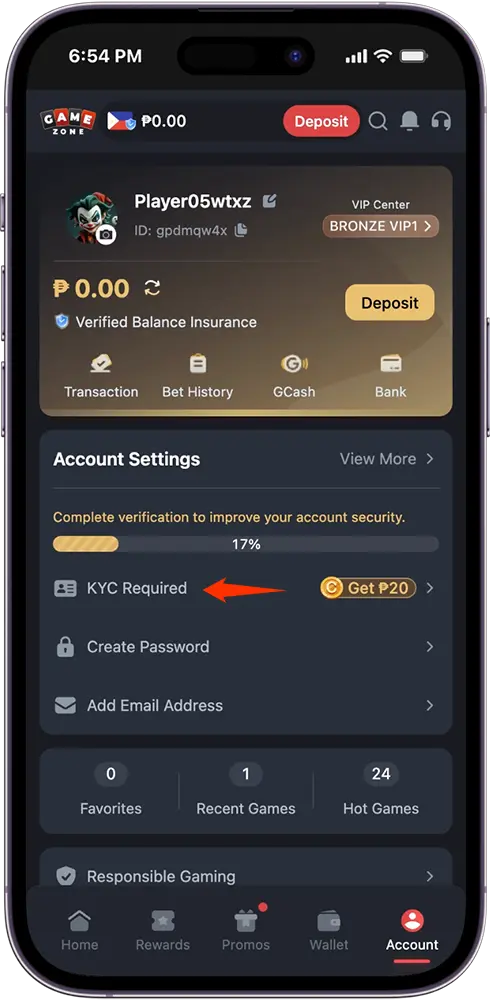
Step 2: Tap “KYC Required”
You’ll find this under Account Settings, along with a progress indicator showing how complete your account setup is. Completing it also comes with a bonus reward, which we’ll cover shortly.
Step 3: Select Your Type of ID
Choose from the available ID options — such as UMID, TIN, SSS, and other accepted government IDs — then tap “Next” to proceed. Make sure the ID you select is still valid and matches the personal details on your account.
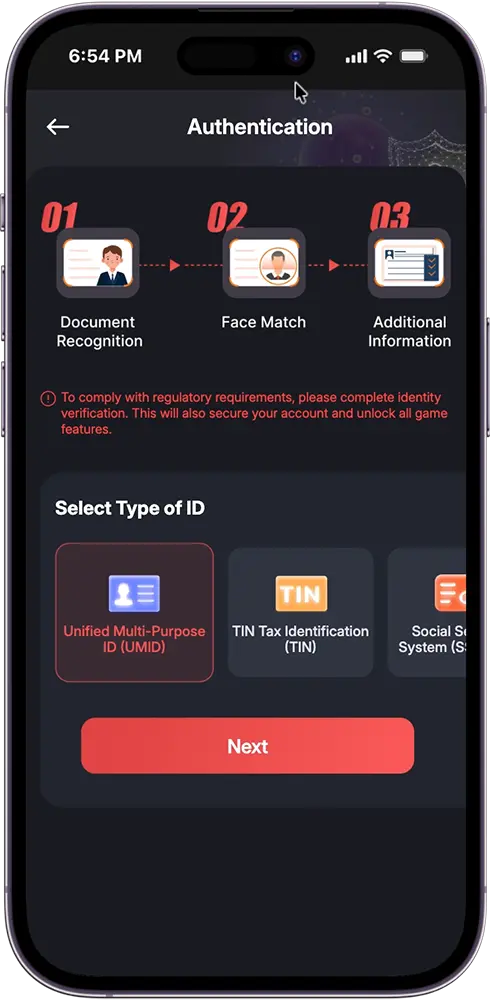
Step 4: Complete Document Recognition
Allow camera access and scan your ID — front and back. Our system checks that your ID is legible, valid, and consistent with the information you’ve provided. Good lighting and a steady hand go a long way here, since a clear scan means faster processing.
Step 5: Complete Face Match
Take a quick selfie scan to confirm that the ID matches you. This liveness check compares your face against your ID photo in real time, helping prevent identity fraud and keeping your account secure. Make sure you’re facing the camera directly with your face fully visible and well-lit.
Step 6: Submit Additional Information
Review your details one more time and submit your information to finalize the process. This is your last chance to catch any typos or mismatched details before submission.
Step 7: Wait for Verification
Once submitted, your information goes through processing. You’ll see your verification status update in your Account Settings once it’s complete — at which point your account is fully unlocked, with no more restrictions on withdrawals or platform features.
GZone eKYC Verification: Common Issues and How to Fix Them
Most GZone eKYC verification issues come down to small, fixable mistakes. Here’s a closer look at what to watch out for and how to avoid them:
| Issue | How to Fix It |
| Blurry or unclear ID scan | Scan in a well-lit area, hold your camera steady, and make sure there’s no glare on the ID surface |
| Expired or invalid ID | Double-check that your chosen ID is still valid before starting the process |
| Mismatched personal details | Make sure the information you submit exactly matches what’s printed on your ID |
| Failed face match | Retry in better lighting, remove any face coverings or accessories, and keep your face fully visible to the camera |
| Incomplete submission | Review all required fields before submitting to avoid processing delays |
| Verification taking longer than expected | This can happen during high-traffic periods; give it some time before attempting again |
If verification doesn’t go through on your first try, don’t worry — you can simply attempt the process again with corrected details. Most issues are quick fixes, and a second attempt usually resolves them. If problems persist even after retrying, our 24/7 customer support team is ready to help you sort it out via phone, live chat, or email.
Bonus Tip: Get Rewarded for Verifying
Here’s a nice perk: completing your eKYC verification doesn’t just unlock your account — it also comes with a reward. Players who complete their KYC verification can receive a ₱20 Bonus Credit, giving you a little extra to play with the moment you’re verified.
It’s a simple way to make sure verification pays off twice — once by unlocking full platform access, and again with bonus credits in your account.

Verified and Ready to Win
That’s the whole process — a few quick steps, and your account is fully unlocked. No more limits, no more waiting to withdraw your winnings, just full access to everything we offer.
Complete your GameZone eKYC verification today and claim your ₱20 Bonus Credit. Your winnings are waiting to be cashed out!
Frequently Asked Questions (FAQs)
Is GameZone eKYC verification mandatory?
Yes. Completing eKYC verification is required to unlock full platform access, including the ability to withdraw your winnings.
Can I still play games without completing eKYC?
You can access certain features after registering, but withdrawals and some platform functions remain locked until your eKYC verification is complete.
How long does eKYC verification take to process?
Verification is usually quick, often completed within minutes. During high-traffic periods, it may take a bit longer.
What happens if my eKYC verification fails?
You can simply try again. Double-check your ID validity, scan quality, and personal details, then resubmit for another review.
Do I get anything for completing eKYC verification?
Yes. Players who complete their eKYC verification receive a ₱20 Bonus Credit as a reward for verifying their account.